Reminders
The follow-ups nobody has time to chase. OPEROGEN reminds the right person at the right time: reviews before the cycle ends, goals with no check-in, 360 feedback due, 1:1s tomorrow, improvement plan milestones, probations ending, shortlists waiting and offers about to lapse. Each reminder is sent once, and you choose which ones run.
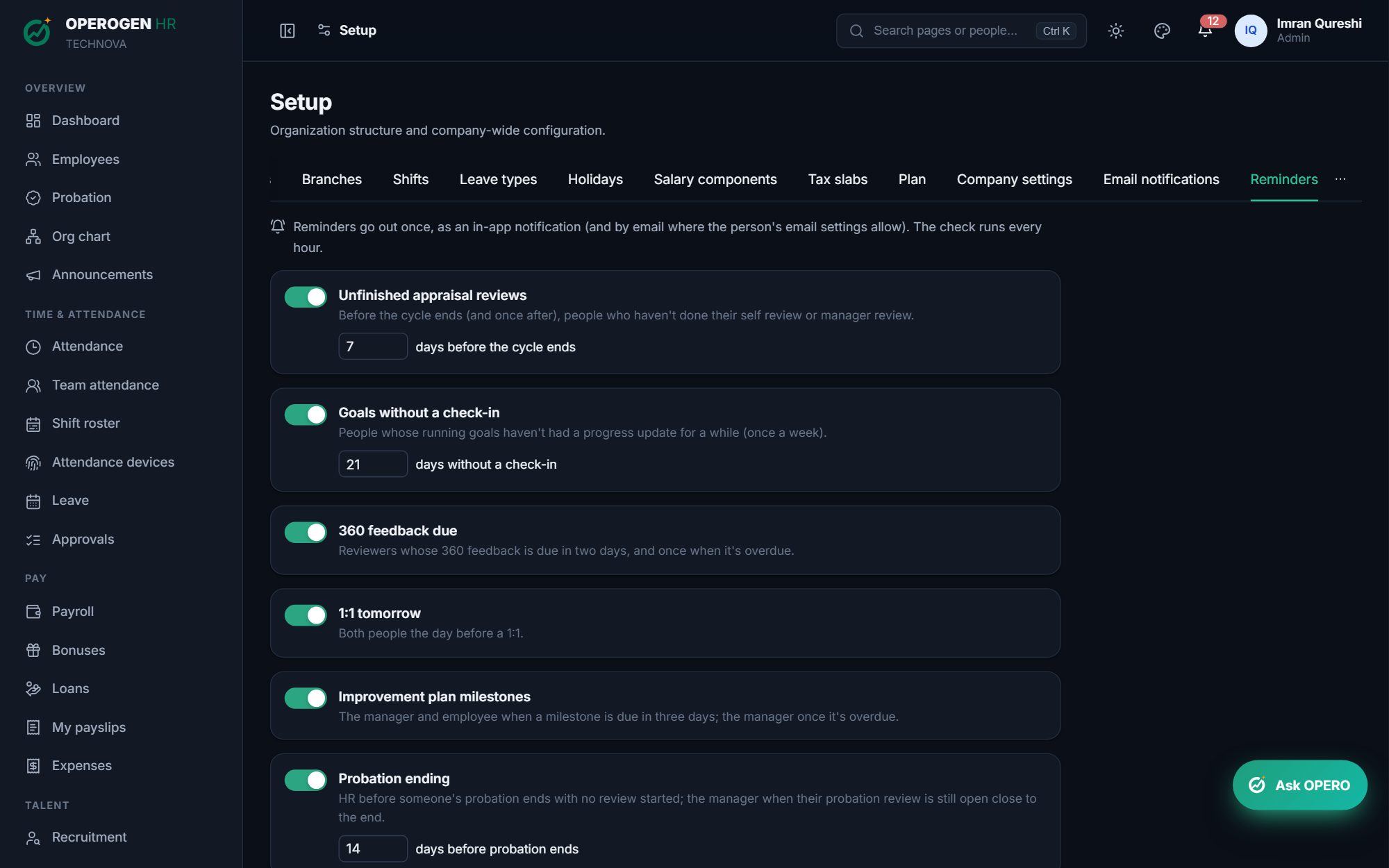
Everything in Reminders.
Reviews on time
Unfinished self and manager reviews are reminded before the cycle ends, and once after.
Goals and 360 feedback
A nudge when a running goal has had no check-in, and when 360 feedback is due or overdue.
1:1s and improvement plans
Both people hear the day before a 1:1; milestones due or overdue are flagged.
Probation
HR hears when a probation is ending with no review, and the manager when theirs is still open.
Hiring
The hiring manager is nudged when a shortlist waits, and candidates are reminded before an offer lapses.
Your choice
Turn each reminder on or off and set its days in Setup.
Three steps. That's it.
- 1
Open Setup and choose your reminders.
- 2
Set the days for each one.
- 3
OPEROGEN sends each reminder once, by email and in the app.
See Reminders in action.
A 30-minute walkthrough of the modules you care about, with your questions answered by the people who built it.